
Prerequisites
Prerequisites
Complete these first:
- Enable IAM Identity Center in the management account
- Deploy Organisation
Introduction
User access in a Fjall organisation is declared in code. TheidentityCentre block of fjall/organisation/infrastructure.ts describes your
users, groups, permission sets, and memberships. fjall org deploy makes AWS
IAM Identity Center match the declaration. No imperative user command writes to
AWS behind your back, so every access change lands as a reviewable diff in your
infrastructure file.
fjall user verbs. They are
safe file editors that produce the same diff.
Choosing an identity source
Thesource field declares who owns user objects. Pick the row that matches
your organisation.
external (IdP-owned, recommended)
Your IdP owns user creation and deletion. The config declares only group memberships, and Fjall resolves each email against the identity store at deploy time. Declaring ausers block in this mode fails synth with a message telling
you to switch to external-manual.
--wait polls the identity store until the first SCIM-provisioned user
appears, with a 1800-second budget you can change via --timeout <seconds>.
If an email has not synced from your IdP yet, the deploy fails with a
prescriptive IDC_* error. See the
error ladder in the CLI reference.
When a user is deleted and recreated in your IdP, run fjall user rebind and
redeploy to re-bind memberships to the new identity.
fjall-managed
Fjall creates and manages the user objects. Declare each user with their memberships:users entry. Without one the deploy
fails at synth time. Users receive an AWS invitation email and set up MFA on
first sign-in.
external-manual
SAML without SCIM. AWS requires user objects whose usernames mirror your IdP NameIDs, so declare them the same way asfjall-managed users. Memberships for
emails not declared under users fall back to an identity-store lookup at
deploy time.
Groups, permission sets, and memberships
Every organisation deploys with four built-in permission sets and their matching groups.ManagementAccountAccess is scoped to the management account alone, carries
2-hour sessions, and ships memberless. It grants nothing until someone joins
the group.
Beyond the defaults, the config declares custom groups and permission sets:
accounts: whichACCOUNTS-map names the set is assigned to. Default is every workload account. For a custom set,includeManagementAccount: trueis the only route to the management account. The built-inManagementAccountAccessalready carries it.sessionDuration: ISO 8601, betweenPT1HandPT12H. Omit it and AWS applies its ownPT1Hdefault.managedPolicies,customerManagedPolicies,inlinePolicy, andpermissionsBoundary: the policy surface, mirroring AWS permission sets.groups: which groups the set binds to. Omit it and Fjall creates an implicit same-named group and binds that.- A permission set named after a built-in merges over that built-in’s spec, so
you can retune
sessionDurationoraccountswithout restating the policy.defaultPermissionSets: falsesuppresses all four built-ins.
Day-to-day access changes
Use the CLI verbs to edit the declaration, then deploy.--first and --last declare the user entry itself, which fjall-managed and
external-manual sources require. --live reads the Identity Center identity
store, so it needs organisation AWS credentials.
In an interactive shell, each successful write ends with an offer to run the
organisation deploy in the same session. Identity-only organisation deploys
typically take 2 to 5 minutes. Under --non-interactive or --agent the CLI
prints the same estimate as a hint and makes no offer.
Audit any time with:
Verify provisioned users (external mode)
After connecting an IdP:- Log in to the AWS Console
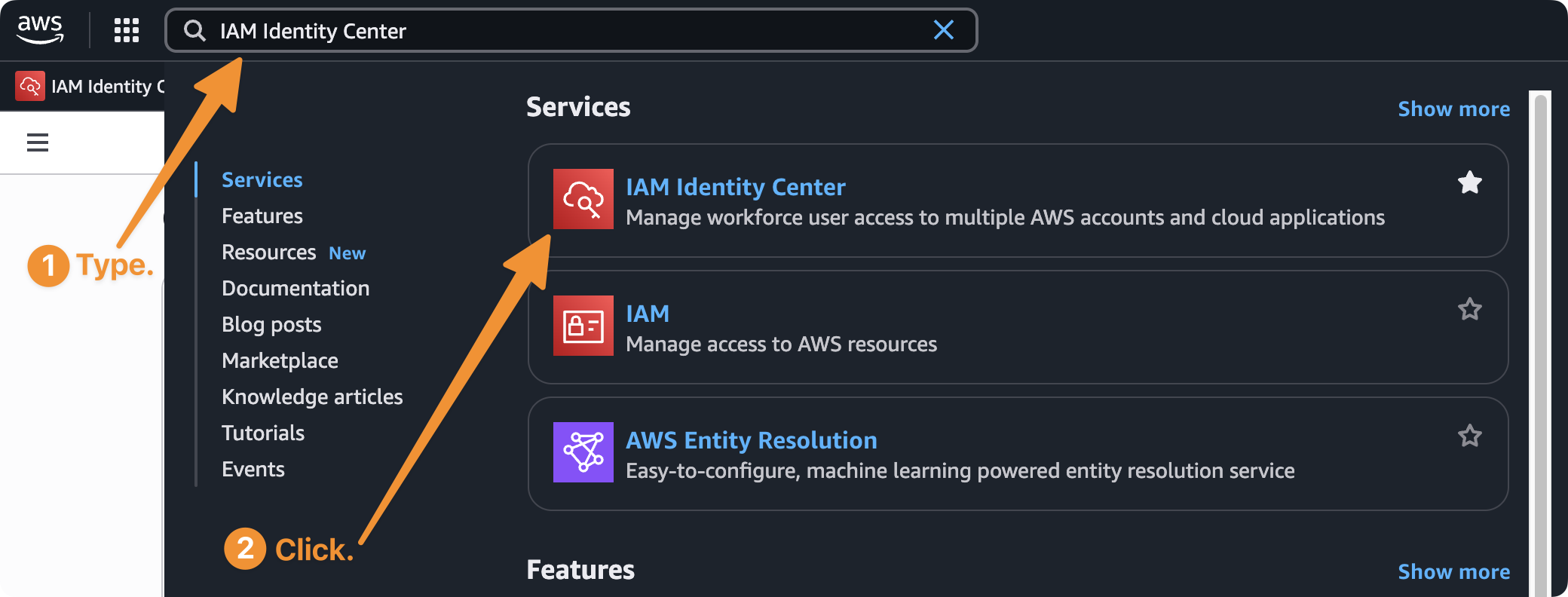
- In the top-left search bar, type IAM Identity Center and click the first result
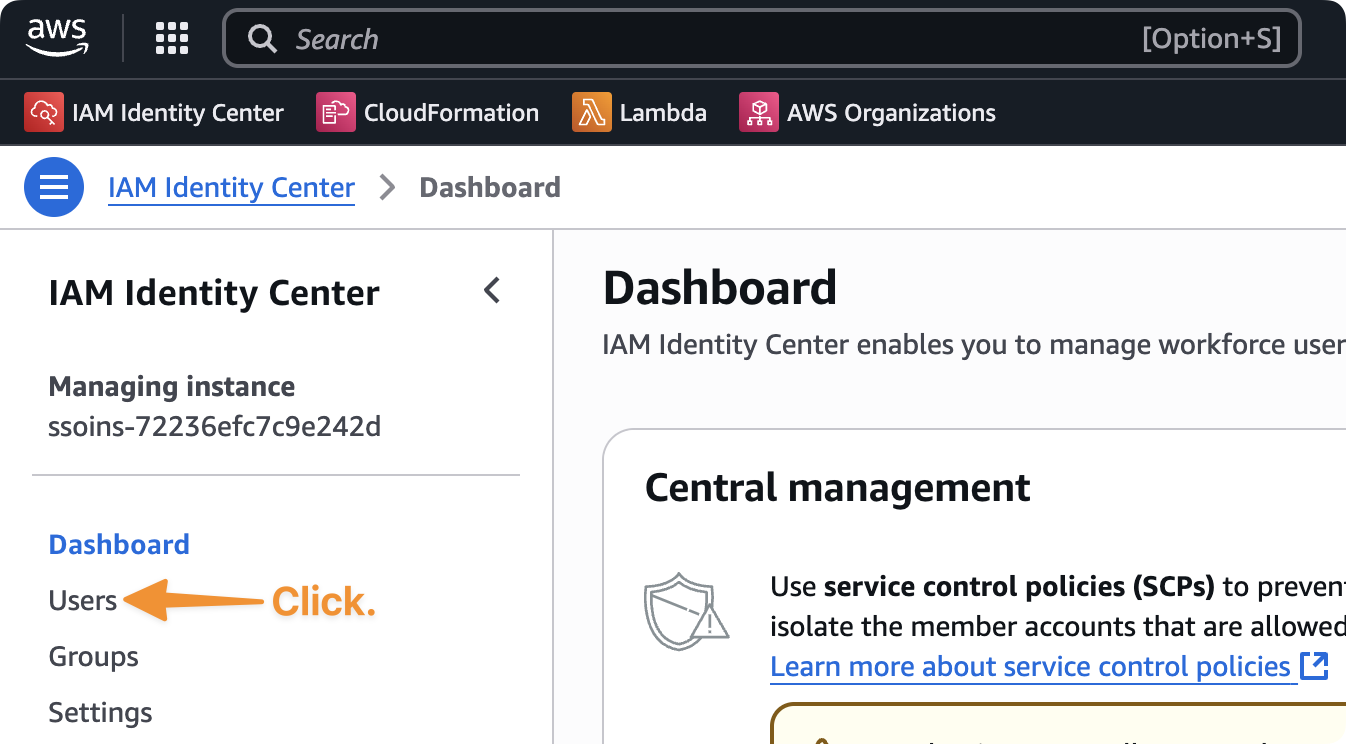
- Navigate to Users in the left navigation pane
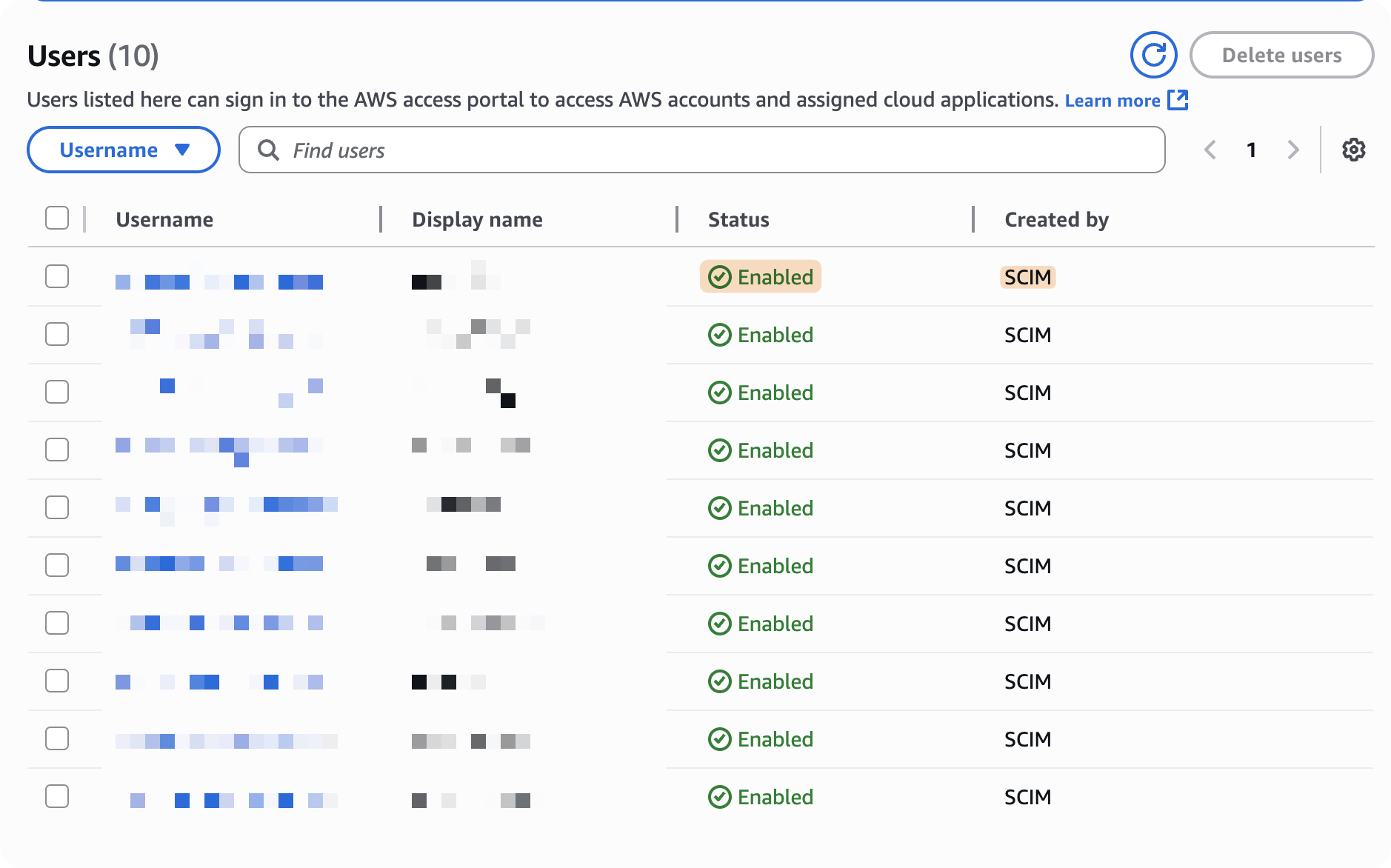
- You should see your users listed
- Check that Status is Enabled
- Check that Created by shows SCIM
fjall user list --live prints in-store or not-synced
per declared email, plus a drift column for memberships that are declared but
not yet live.
Next Steps
User CLI Reference
Full
fjall user verb reference and error ladder.AWS Profiles and Targets
See how Fjall derives profiles and resolves deploy targets.
Deploy Organisation
Deploy your AWS organisation.
Agent Tokens
Issue scoped API tokens for CI/CD and automation.